Texas counties deliver courts, jails, public health, elections, tax offices, and emergency services to more than 19 million residents in the state’s ten most populous jurisdictions alone. The Texas Association of Counties (TAC) — the statewide membership organization supporting all 254 Texas counties — helps counties share best practices on cybersecurity, elections, and public safety.
An independent cybersecurity review of the 10 largest Texas counties by population (2024 U.S. Census estimates) reveals a wide range of email and domain security results — from strong authentication on a few .gov sites to scores in the 40s on others handling tax, court, and vendor payments daily.
Using data from audit.emailmenow.com, we evaluated each county’s primary public domain across email, website, and network security — including SPF, DKIM, DMARC, MTA-STS/TLS, and security headers.
Counties in this review (by population)
| County | Seat / metro | 2024 est. population |
|---|---|---|
| Harris | Houston | 4,764,000 |
| Dallas | Dallas | 2,624,000 |
| Tarrant | Fort Worth | 2,131,000 |
| Bexar | San Antonio | 2,078,000 |
| Travis | Austin | 1,345,000 |
| Collin | McKinney / Plano | 1,109,000 |
| Denton | Denton | 1,025,000 |
| Hidalgo | Edinburg / McAllen | 898,000 |
| El Paso | El Paso | 872,000 |
| Fort Bend | Richmond / Sugar Land | 858,000 |
Texas Association of Counties
TAC’s public site county.org scored 48% (Below Average) on June 22, 2026 — below the passing band for email authentication on many enterprise audits. County IT leaders use TAC for training and policy templates; member counties should treat domain hardening as part of the same program as HB 3834 training and Texas DIR framework alignment.
Audit link: county.org
Cybersecurity Scores of Major Texas Counties
Overall compliance scores from audit.emailmenow.com, measured June 22, 2026. Counties ranked by audit score; re-run any domain at the link to verify.
| Rank | Organization | Domain | Overall Score | Website Score | Performance Level |
|---|---|---|---|---|---|
| 1 | Dallas County | dallascounty.org | 78% | 92% | Good |
| 2 | El Paso County | epcounty.com | 71% | 70% | Good |
| 3 | Travis County | traviscountytx.gov | 68% | 92% | Good |
| 4 | Bexar County | bexar.org | 67% | 70% | Above Average |
| 5 | Tarrant County | tarrantcounty.com | 64% | 45% | Above Average |
| 6 | Denton County | dentoncounty.gov | 58% | 92% | Average |
| 7 | Harris County | harriscountytx.gov | 54% | 45% | Average |
| 8 | Collin County | collincountytx.gov | 45% | 70% | Below Average |
| 8 | Hidalgo County | hidalgocounty.us | 45% | 70% | Below Average |
| 10 | Fort Bend County | fortbendcountytx.gov | 44% | 45% | Below Average |
Website Security Scores
Scores ranged from 92% to 45%; 0 of 10 reached the 100% ideal and 3 scored below 60%.
| Rank | Organization | Domain | Website Score | Rating |
|---|---|---|---|---|
| 1 | Dallas County | dallascounty.org | 92% | Strong |
| 1 | Travis County | traviscountytx.gov | 92% | Strong |
| 1 | Denton County | dentoncounty.gov | 92% | Strong |
| 4 | Bexar County | bexar.org | 70% | Good |
| 4 | Collin County | collincountytx.gov | 70% | Good |
| 4 | El Paso County | epcounty.com | 70% | Good |
| 4 | Hidalgo County | hidalgocounty.us | 70% | Good |
| 8 | Harris County | harriscountytx.gov | 45% | Below Average |
| 8 | Tarrant County | tarrantcounty.com | 45% | Below Average |
| 8 | Fort Bend County | fortbendcountytx.gov | 45% | Below Average |
What the Results Reveal
- Scores span 78% down to 44% — only 2 of 10 counties reach a “Good” (70%+) overall posture on the primary domain audited.
- 5 of 10 scored below 60% overall, leaving residents, vendors, and staff exposed to phishing and
.govimpersonation. - Harris County (state’s largest by population) scored 54% overall with a 45% website score — a gap worth prioritizing given Houston–area breach volume tracked in Texas OAG reports.
- Strong website scores (92%) on Dallas, Travis, and Denton show header hardening is achievable; weak email layers on other counties suggest inconsistent programs across the same metro regions.
Attack exposure in this audit
Domains scoring near 44% combine weak identity enforcement, missing inbound transport protections, and sub-60% website hardening. Without naming specific organizations, entities in that tier are disproportionately exposed to:
- Public-sector procurement fraud — spoofed
.govmail used to alter vendor payment instructions and grant reimbursement accounts. - Business email compromise (BEC) — spoofed messages appearing to come from executives or accounts payable, used to redirect wires and ACH payments.
- Brand impersonation phishing — fake billing, HR, and vendor notices that pass visual inspection because DMARC and SPF are not fully enforced.
- Credential harvesting — login pages linked from forged
@company.commail aimed at employees, contractors, and customers. - Invoice and procurement fraud — altered payment instructions sent to finance teams and partners who trust the corporate domain.
- Account-recovery abuse — password-reset and MFA prompts triggered from impersonated sender addresses.
- Inbound mail downgrade attacks — absence of enforced MTA-STS allows opportunistic TLS stripping on messages destined for the organization.
- Clickjacking and session risks — missing HSTS, CSP, and frame protections on the public site increase browser-side attack surface for visitors and logged-in users.
- Supply-chain targeting — partners who whitelist the domain for deliverability become secondary victims when spoofed mail originates unchecked.
- Header gaps at scale — 3 of 10 domains scored below 60% on website security in this audit. Clickjacking and session risks are not confined to the bottom tier; many names share a 45% website score — the same floor shared by 2 other domains in this audit.
These are not theoretical edge cases. State breach portals and FBI IC3 reporting consistently tie weak email authentication and header gaps to measurable financial loss at large enterprises.
Real attacks, told as stories
The stories below are made up, but they are based on real crimes that police and cybersecurity teams see every year. No Texas county is named. Each story shows how weak domain settings can hurt real people — residents, vendors, and employees who interact with Texas county government.
Story 1: Maria and the payment that was not real
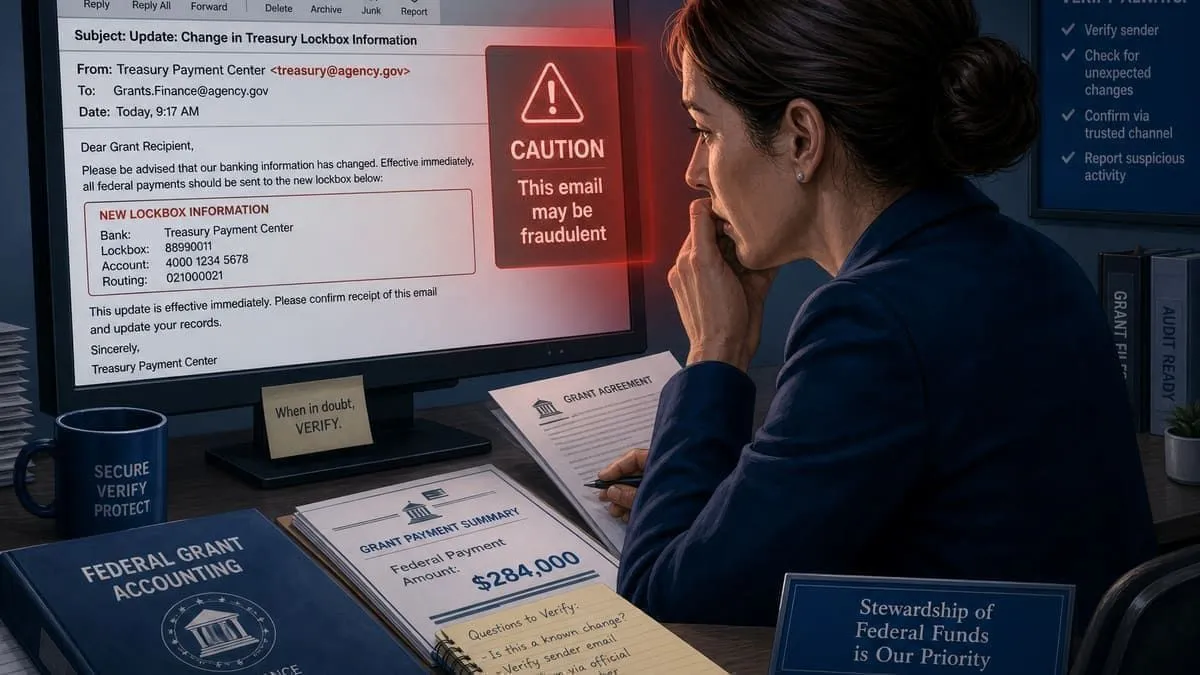
Maria works in a grants accountant at a state agency vendor that invoices a federal program.
On a Tuesday morning, she gets an email that looks normal:
From: accounts-payable@bigbrand.com
Subject: New treasury lockbox for grant reimbursements
The logo looks right. The tone sounds like past federal payment notices. A PDF lists a new routing number.
Maria does not know that bigbrand.com has weak email security. A stranger sent the message from their own server and pretended to be the big brand. That is called brand impersonation.
She approves a $284,000 wire. The money goes to the attacker, not the real company.
The next day, the same fake sender emails two more partners Maria knows from procurement meetings. One ignores it. One also changes bank details. That is supply-chain targeting — hurting partners by faking the main organization’s name.
Attack vectors in this story: brand impersonation · invoice and procurement fraud · supply-chain targeting · business email compromise (BEC)
Simple fix: Strict DMARC (p=reject), SPF (-all), and a rule that every bank change needs a phone call to a known contact — not just email.
Story 2: Jordan clicks “reset password”
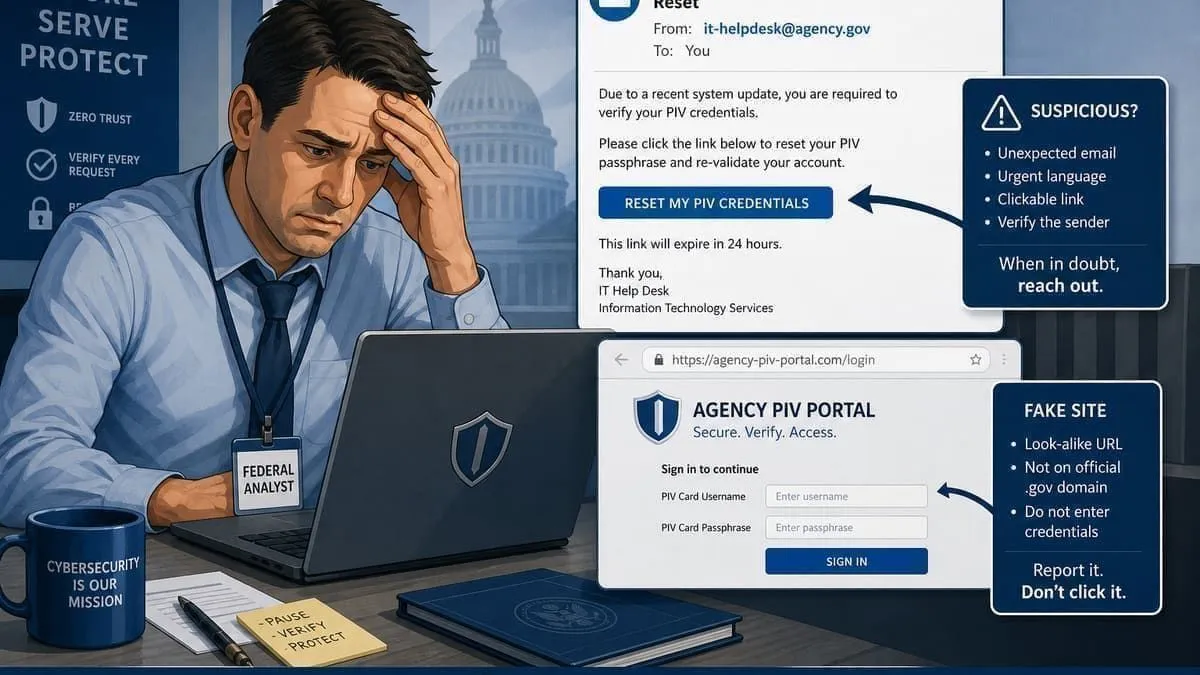
Jordan is a program analyst at a federal agency. On Wednesday at 2 p.m., his phone buzzes:
From: it-security@bigbrand.com
Subject: Reset your password in 2 hours or lose access
Jordan is busy. The email looks like IT mail he has seen before. He clicks the link.
The page looks like his company login. It is not. It is a copy on a similar-looking website (bigbrand-secure.com). He types his username and password. The attacker saves them.
This is account-recovery abuse and credential harvesting. The criminal used a fake “reset your account” message because people trust mail from @company.com.
That night, the attacker signs into Jordan’s mailbox and reads old threads about an emergency procurement wire. On Thursday, they email the CFO’s assistant:
From: cfo@bigbrand.com
Subject: Urgent — confidential wire for escrow
That is BEC — business email compromise. The assistant almost approves it. A bookkeeper asks, “Did you talk to the CFO on the phone?” The wire stops. Jordan still has to change every password he reused.
Attack vectors in this story: account-recovery abuse · credential harvesting · business email compromise (BEC)
Simple fix: DMARC p=reject, train staff that IT will never rush a reset by email alone, and require a callback before any wire.
Story 3: The contract email no one knew could be copied
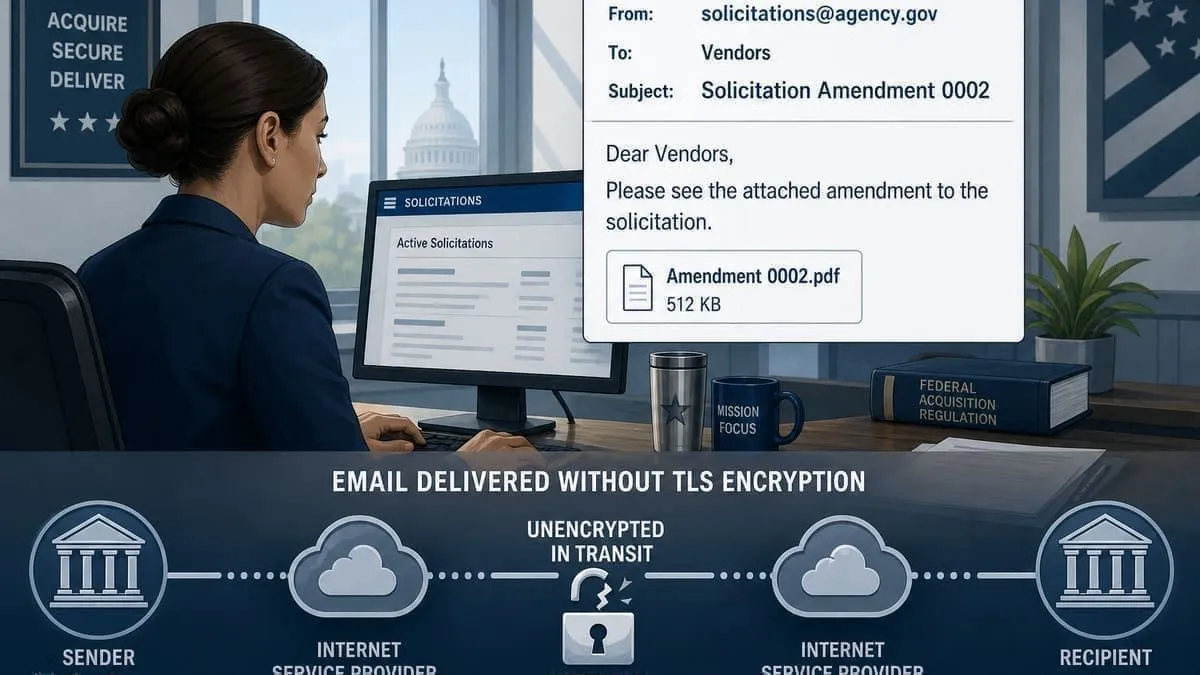
Priya is a contracting officer emailing solicitation amendments. She emails a solicitation amendment to an inbox at @bigbrand.com. The send button works. Her screen says Delivered.
What Priya cannot see: on part of the internet path, the mail server connection was downgraded from locked (TLS) to unlocked. Without MTA-STS set to mode=enforce, the recipient’s mail system still accepts the message. An attacker on that path can copy attachment text in plain form.
This is an inbound mail downgrade attack. Most people worry about fake outgoing email. MTA-STS protects incoming mail — mail sent to your organization.
Priya’s CIO shop sees green checkmarks in their dashboard. Nothing looks wrong. Weeks later, a bidder appears to know evaluation criteria early. The leak might have started on the wire, not in someone’s inbox.
Attack vector in this story: inbound mail downgrade (no MTA-STS)
Simple fix: Publish MTA-STS in enforce mode and turn on TLS-RPT reports so IT gets alerted when encryption fails.
Story 4: Alex applies for a job online
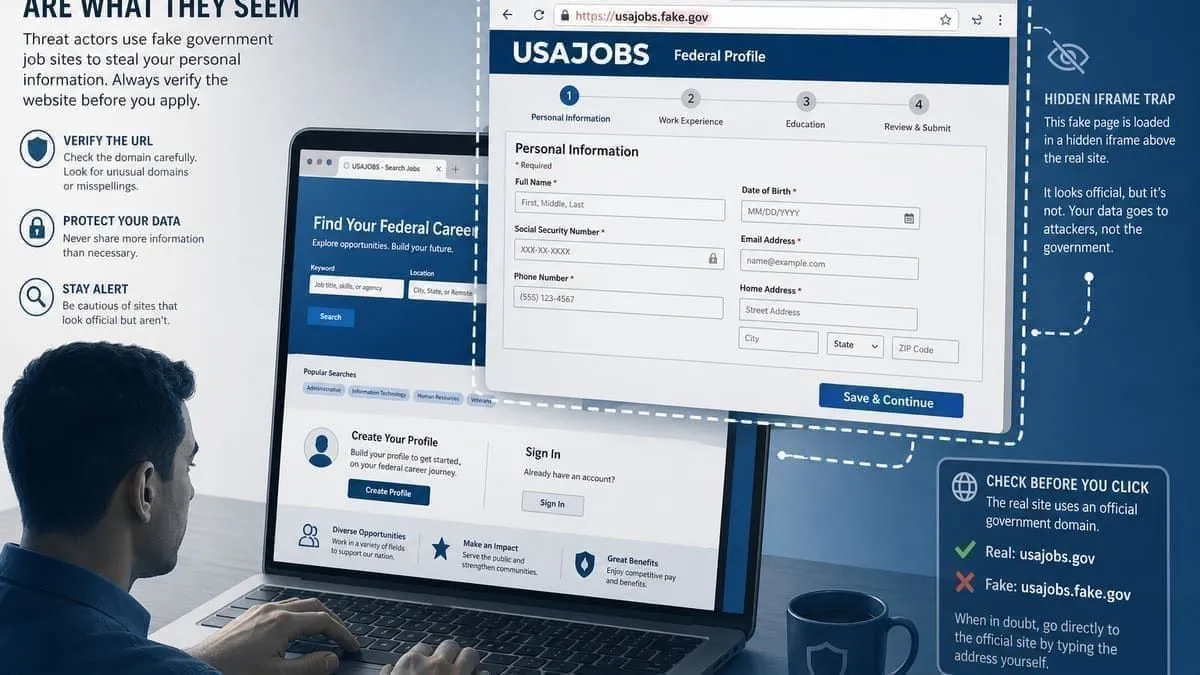
Alex is a college senior. He is already logged into his school portal in one browser tab. In another tab, he opens a job post: “Federal careers — verify your USAJOBS profile.”
The site asks him to “confirm your profile” on what looks like the real company careers page. He clicks.
He does not know the page is a trap. The real login screen is hidden inside an invisible frame on a scam site. That trick is called clickjacking. The company’s website scored 45% on security headers — a floor shared by 3 of 10 domains in this audit, missing strong HSTS, CSP, and frame blocking.
Alex thinks he is on the real site. He is really interacting with a layer the attacker controls. If he had been logged into the company’s vendor portal in another tab, the same trick could hijack that session.
No phishing email was needed. The attack lived on the website, not in the inbox.
Attack vectors in this story: clickjacking · session risks (missing HSTS/CSP)
Simple fix: Add HSTS, Content-Security-Policy, and frame-ancestors / X-Frame-Options so login pages cannot be embedded on random sites.
How the stories connect
All four stories can hit one organization with a weak audit score (near 44%):
| Story | Who got hurt | Main gap |
|---|---|---|
| Maria (partner) | Outside partners | Fake mail from your domain |
| Jordan (employee) | Inside staff | Fake password-reset mail |
| Priya (professional) | Confidential data in transit | Incoming mail not forced to stay encrypted |
| Alex (visitor) | Website visitors | Login page can be framed by attackers |
Together, that is not one bug — it is a pattern. Fixing it means better DNS (DMARC, MTA-STS), better website headers, and better office rules (call back before you wire).
Why This Matters in Texas
Texas counties must maintain written cybersecurity policies under Texas DIR guidance, certify HB 3834 awareness training, and designate a security coordinator under SB 820. County tax, court, and vendor-payment workflows are routine BEC targets — especially when .gov domains score below 60%.
The Texas Association of Counties supports all 254 counties with resources on elections, jails, and technology. County commissioners courts should align TAC policy templates with measurable DMARC enforcement and MTA-STS on every public-facing domain — not only the largest metros.
See also — related audits
- Top Texas school districts (2026)
- Federal agencies (.gov) national audit
- Texas OAG breach reports YTD
- Government & education breach tracker
Recommendations
- Enforce DMARC (
p=reject), strict SPF, and DKIM on every county domain and subdomain used for outbound mail. - Add MTA-STS in enforce mode and publish TLS-RPT for inbound mail protection.
- Harden website security headers (HSTS, CSP, frame controls) on portals residents use for payments and records.
- Document policies for SB 2610 Safe Harbor tier-appropriate programs where counties operate as business-facing entities.
- Run periodic domain audits before incidents drive emergency remediation.
Check any organization’s posture. Run a free Instant Cybersecurity Audit at audit.emailmenow.com/?industry=local-government&state=texas.
Contact EmailMeNow IT Consulting for help with email security hardening, HB 3834 documentation, and county vendor-payment callback policies.
Source & methodology: Overall compliance scores from the free scan at audit.emailmenow.com, measured June 22, 2026 — each domain checked for email authentication (SPF, DKIM, DMARC), transport security (MTA-STS/TLS), website security headers, and network security. Population figures from 2024 U.S. Census county estimates. Texas Association of Counties referenced as the statewide county membership organization. Re-run any domain at the audit link to verify.