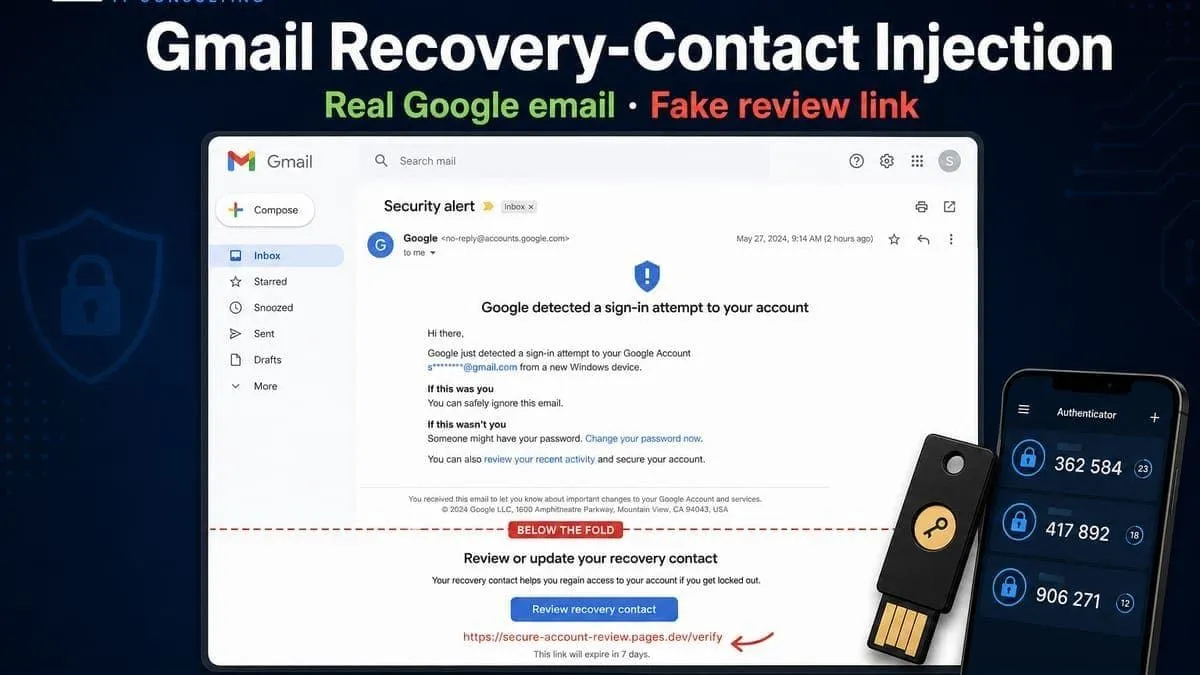
A widely shared walkthrough by Trevor Nace (YouTube) shows a Gmail / Google Account recovery-contact injection pattern: the message is a real Google notification, so mailbox filters that trust SPF, DKIM, and DMARC still treat it as authentic. The bait is a fake “review” / secure-your-account link that leads to a credential-harvest page styled like Google — not a spoofed From address.
Public research in May–2026 (including disclosure discussion around recovery-contact free-text abuse) describes the same structural gap: authentication proves Google sent the mail; it does not prove the user-controlled payload is safe.
Snapshot
| Field | Detail |
|---|---|
| Pattern | Recovery-contact request abuse / “injection” into a real Google email |
| Why it fools filters | Mail originates on Google infrastructure — SPF / DKIM / DMARC pass |
| Lure | Fake “review” recovery contact / secure account link (often lookalike login) |
| Goal | Steal Google password / session → inbox takeover |
| Primary fix | Never click security links — open myaccount.google.com yourself |
| Strong MFA | Passkeys + hardware security key (YubiKey-class) + Google Authenticator / open TOTP |
How the attack works
- An attacker starts a recovery contact flow that names your address (or injects attacker-controlled text into a Google-generated notice).
- Google’s systems send you a genuine notification from Google mail infrastructure.
- The visible body can be padded (whitespace / decoy copy) so a fake “you already approved” story and a phishing link appear where victims expect official actions.
- The link may look like
accounts.google.comin the UI while landing on a clone (or an attacker-controlled page on free hosting such as Google Sites — reported in related campaigns). - If you enter credentials there, the attacker can take over the account — especially when MFA is only SMS.
| What you see | What is actually true |
|---|---|
| “From Google” / authenticated mail | Correct — Google’s servers sent it |
| “Review recovery contact” button | Often attacker-controlled destination |
| Link text resembling accounts.google.com | Destination may be a clone or Sites lure |
| Urgency / “already approved” language | Social engineering — verify in-account only |
What to do right now (do not click email links)
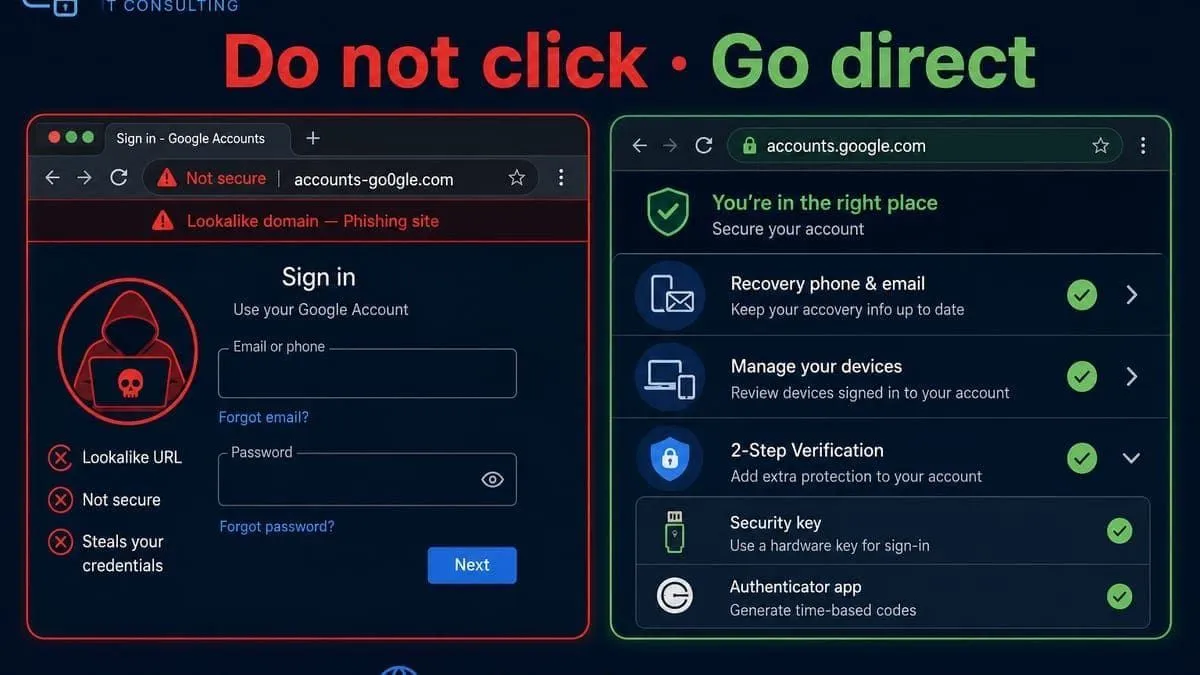
- Ignore links in unexpected Google security mail. Type the URL yourself or use a bookmark.
- Open Google Account → Security and check recovery phone, recovery email, and recovery contacts. Remove anything you did not add.
- Open Manage all devices / your devices list. Sign out anything you do not recognize.
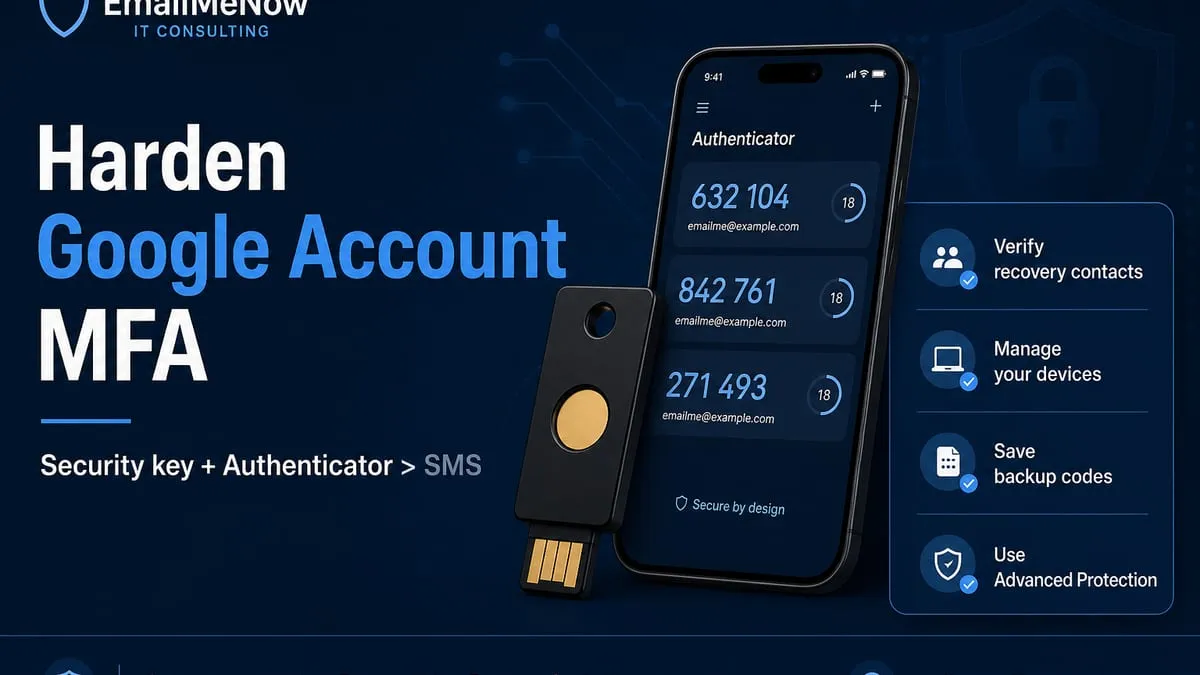
- Turn on 2-Step Verification. Prefer a passkey, hardware security key, and/or Google Authenticator (or another open TOTP app) — not SMS alone.
- Store backup codes offline in a safe place.
- High-risk users: consider Google’s Advanced Protection Program.
Google MFA: Passkeys, YubiKey, and Google Authenticator
Official Google docs support passkeys, phishing-resistant security keys, and authenticator-app codes. Directory grade for Google Account: Strong in the MFA support directory — YubiKey, authenticator apps & passkeys (Proton Account is also listed Strong there).
| Method | Status | Prefer for this threat? |
|---|---|---|
| Passkeys (FIDO / WebAuthn) | Documented | Yes — resists fake login pages |
| Hardware security key / FIDO (YubiKey-class) | Documented | Yes — phishing-resistant |
| Google Authenticator / open TOTP | Documented | Yes — better than SMS |
| Google prompt (push) | Documented | Good daily option |
| SMS / voice codes | Documented | Avoid as only factor (SIM-swap class) |
Why passkeys help here: Recovery-contact injection steals passwords typed into a clone site. A passkey is bound to the real google.com / accounts.google.com origin — a lookalike page cannot complete the same WebAuthn ceremony.
Docs: Sign in with a passkey · Turn on 2-Step Verification · Use a security key
Where to store Google Account passkeys
Create or manage passkeys at myaccount.google.com/signinoptions/passkeys (type the URL — do not use a link from email). Google lets you create a passkey on the device you are on, on another device (QR), or on a FIDO2 hardware security key.
| Passkey provider | What it is | Example use with Google |
|---|---|---|
| Google Password Manager | Default sync vault in Chrome / Android Credential Manager (passwords.google.com) | Create a Google Account passkey → save to Google Password Manager → unlock with fingerprint / face / screen lock across signed-in devices |
| Proton Pass | Cross-platform password manager with passkey storage (passkey guide; sign up) | When the OS/browser asks where to save the passkey, choose Proton Pass (browser extension, Android 14+ credential provider, or iOS 17+) |
| FIDO2 security key | Physical YubiKey-class key (5C NFC / 5 NFC) | At passkey setup, choose Use another device / security key → touch the key (device-bound; no cloud sync) |
Note on “Google Wallet”: Google Wallet holds payment cards and digital passes — it is not the passkey vault. Consumer passkeys on Google’s stack live in Google Password Manager (and the Android/Chrome credential UI that surfaces it). Proton Pass is a separate manager you can select instead when the platform offers a provider picker.
| Example flow | Steps |
|---|---|
| Google Password Manager | Open passkeys settings → Create a passkey → unlock the phone/PC → confirm save in Google Password Manager |
| Proton Pass | Same Google create-passkey prompt → pick Proton Pass as the provider → confirm in the Pass extension/app (guide; Pass) |
| Hardware key | Passkeys settings → Use another device → insert/tap FIDO2 key → set/use key PIN |
Keep a backup: a second device passkey, a second security key, and/or printed backup codes. If you only have one synced vault and lose that account’s unlock path, recovery gets hard.
Recommended MFA tools
| Product | Best for | Get it |
|---|---|---|
| YubiKey 5C NFC | USB-C laptops + NFC phones | Amazon |
| YubiKey 5 NFC | USB-A desktops + NFC phones | Amazon |
| YubiKey 5 / 5C NFC case | Keychain protection for the key | Amazon |
| Proton Pass | Passkeys + authenticator-style TOTP vault | Proton Pass |
We may earn a commission if you buy a YubiKey or sign up for Proton Pass through the links above.
Independent cybersecurity audits
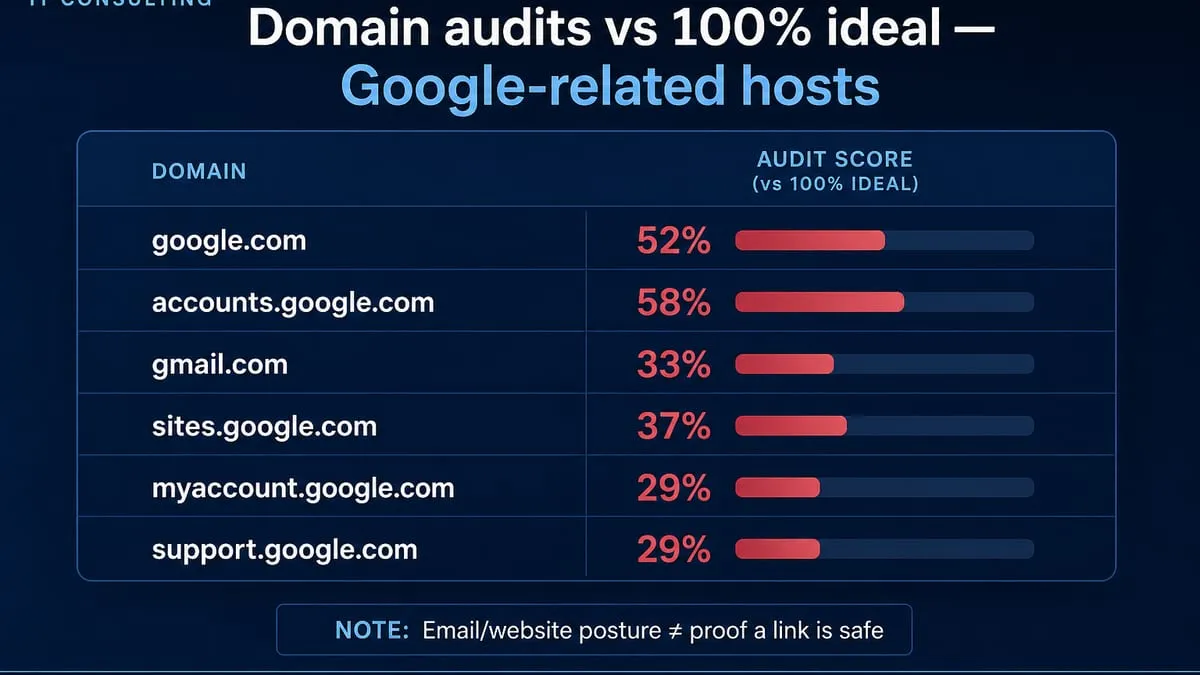
We audited Google-related hosts on August 2, 2026. 100% is the ideal — none reach it. These scores are public email / transport / website posture. They do not mean a link inside a Google-sent message is safe — this attack’s point is that authenticated Google mail can still carry attacker-influenced content.
| Organization | Domain | Overall | Identity | Transport | Website | vs 100% ideal |
|---|---|---|---|---|---|---|
| Accounts | accounts.google.com | 58% | 25% | 15% | 90% | −42 |
| google.com | 52% | 50% | 70% | 45% | −48 | |
| Google Sites | sites.google.com | 37% | 0% | 15% | 65% | −63 |
| Gmail | gmail.com | 33% | 0% | 70% | 40% | −67 |
| My Account | myaccount.google.com | 29% | 0% | 15% | 40% | −71 |
| Support | support.google.com | 29% | 0% | 15% | 40% | −71 |
How to read this table: Use myaccount.google.com by typing it — never via a mail button. Lower scores on consumer portals highlight gap-to-ideal hygiene; they are not an excuse to click injected links.
Audit links: accounts.google.com · google.com · sites.google.com · gmail.com · myaccount.google.com · support.google.com
Website stack note
Passive website-tech probes on August 2, 2026 (0 notable CMS / PHP / short-horizon TLS flags across this set):
| Domain | Stack signal |
|---|---|
| google.com / gmail.com / accounts.google.com / myaccount.google.com / support.google.com / sites.google.com | No notable public CMS/PHP freshness flags (vendor-managed Google surfaces) |
Point-in-time only. Stack hygiene does not validate links inside recovery-contact mail.
Lookalike domains (cybersquat scan)
DNS lookalike scans on August 2, 2026 (EmailMeNow cybersquat engine — registered DNS signals only, not WHOIS authority):
| Brand scanned | To review | Likely owned | BEC staging |
|---|---|---|---|
| google.com | 78 | 15 | 2 |
| gmail.com | 100 | 0 | 4 |
| accounts.google.com | 94 | 0 | 2 |
High-interest registered lookalikes (investigate; not proof of active phishing):
| Lookalike | Technique | Note |
|---|---|---|
| login-google.com | affix | Login-themed |
| support-google.com | affix | Support-themed |
| account-google.com | affix | Account-themed |
| www-google.com | phishing-host | www-prefixed |
| gmail-support.com | affix | BEC staging (MX, no website) |
| gnail.com / qmail.com | adjacent-key / homoglyph | BEC staging |
Many google.* TLD swaps and typos (gogle.com, googel.com, …) already redirect or MX toward Google (likely owned / defensive). Continuous monitoring: Cybersquat Domain Monitoring.
Related
- MFA support directory — YubiKey, authenticator apps & passkeys (Google Account Strong; Proton Strong; Facebook Strong; Instagram Pass)
- FBI NCII / lookalike support phishing
- Top password managers email security
- “You’re Invited” e-vite phishing
- Surfside Beach BEC + lookalike domains
- LastPass / Bitwarden phishing compliance
Run a free audit at audit.emailmenow.com or contact EmailMeNow for phishing response aimed at the 100% ideal.
Sources: Trevor Nace — Gmail Injection Attack Explained · Google — passkeys · Google — 2-Step Verification · Google — security keys · Google — Advanced Protection · Google Password Manager / passwords across devices · Proton Pass — use passkeys · MFA support directory · Public May 2026 recovery-contact / Google-infrastructure phishing reporting (SPF/DKIM/DMARC-pass abuse)